How to Set Up a Smart Thermostat for Energy Savings
Smart thermostats have become a common addition to many households, offering a way to manage heating and cooling systems with greater convenience and potential for efficiency. In the United Kingdom, where energy costs and environmental concerns are prominent, these devices are often considered for their ability to adapt to daily routines and provide insights into energy usage. However, realising the full benefits requires more than just installing the device; it involves understanding how to set it up correctly, configure schedules that match your lifestyle, and adjust settings to align with your heating system’s characteristics.
This article aims to provide a neutral, step-by-step guide to the setup and configuration of a smart thermostat, with a focus on energy savings. It will cover the initial installation, the creation of heating schedules, and the adjustment of various settings that can influence energy consumption. The information presented here is intended to be informational and does not guarantee specific results, as outcomes can vary based on individual homes, heating systems, and usage patterns.
Preparing for Installation
Before physically installing a smart thermostat, it is important to gather the necessary tools and information. Most smart thermostat kits include the thermostat unit, a base plate, screws, and sometimes a level. Additional tools like a screwdriver, drill, and possibly a voltage tester might be required. It is also essential to check the compatibility of the thermostat with your existing heating system. In the UK, common systems include combi boilers, system boilers, and heat pumps, each with different wiring configurations. Many manufacturers provide compatibility checkers online, and it is advisable to consult those or the manual.
Safety is a priority during installation. Turn off the power to your heating system at the circuit breaker to avoid any electrical hazards. If you are not comfortable working with electrical wiring, it is recommended to seek the assistance of a qualified professional. Additionally, take note of the current thermostat’s wiring – photograph it or label the wires to ensure correct reconnection later. This preparation phase is crucial to avoid common mistakes that could lead to malfunction or safety issues.
Wiring and Physical Setup
Once the power is off, remove the existing thermostat from the wall. You will typically see wires connected to terminals, often marked with letters like R, W, Y, G, or C. In the UK, systems may use different markings, so refer to the manufacturer’s instructions provided with your new thermostat. Most smart thermostats include a wiring guide or an app that helps you identify wire functions. Match the wires to the corresponding terminals on the new thermostat’s base, and secure them properly.
After connecting the wires, attach the base to the wall using the provided screws or anchors. Ensure it is level to maintain an accurate temperature reading. Then mount the thermostat display onto the base. Turn the power back on at the breaker, and follow the on-screen or app-based setup to connect the thermostat to your Wi-Fi network. This allows remote access via the manufacturer’s app, which is often used for scheduling and adjustments. It is important to place the thermostat in a central location away from direct sunlight, drafts, and heat sources for optimal performance.
Programming Schedules for Efficiency
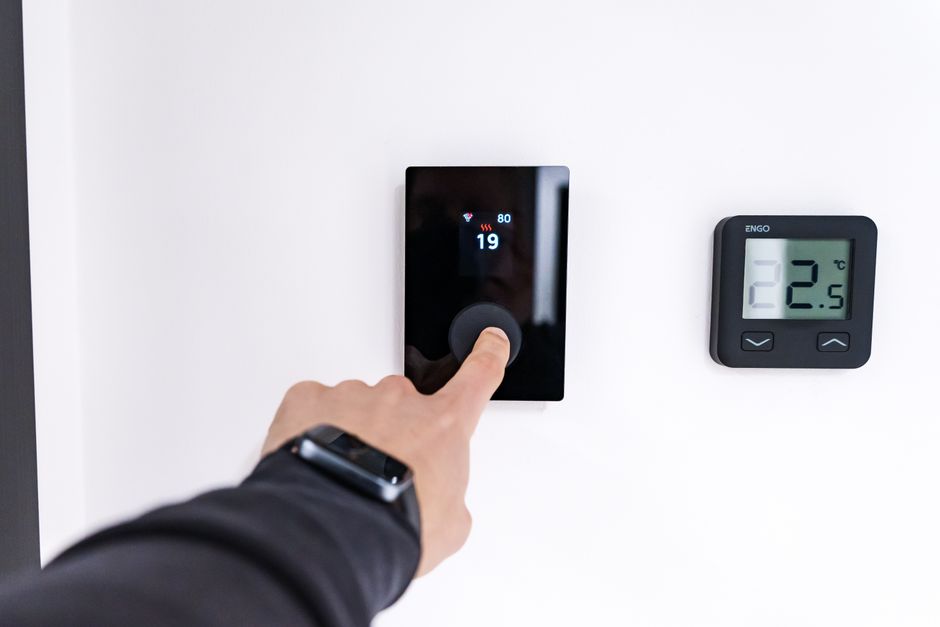
One of the main features of a smart thermostat is the ability to create heating schedules that align with your daily routines. Unlike a traditional thermostat, which maintains a constant temperature unless manually changed, a smart thermostat can be programmed to lower the temperature when you are away or asleep and raise it just before you need it. This approach can lead to energy savings without sacrificing comfort. In the UK, common practice involves setting the heating to come on in the morning before waking, turn off when everyone leaves for work or school, and then resume in the evening.
When creating schedules, consider the thermal characteristics of your home. A well-insulated home may retain heat longer, allowing for longer setback periods. Conversely, a draughty home might need shorter setback periods to maintain comfort. It is also advisable to account for weekends and days when occupancy patterns change. Most smart thermostats allow separate schedules for weekdays and weekends, and some even allow different schedules for each day. The goal is to strike a balance between comfort and energy use, but it is important to note that the actual savings depend on how closely the schedule matches your presence and the performance of your heating system.
To fine-tune schedules, observe how your home responds temperature-wise. If you find it takes a long time to warm up in the morning, you might advance the start time. Similarly, if the house gets too warm in the evening, you could adjust the target temperature slightly downward. These adjustments can be made easily through the app, and many thermostats provide usage reports that show how long the heating ran each day, which can inform changes.
Adjusting Settings for Optimal Performance
Beyond basic scheduling, smart thermostats offer a range of settings that can influence energy consumption. One such feature is geofencing, which uses your smartphone’s location to detect when you are away from home and automatically adjusts the temperature. This can be convenient, but it requires that everyone in the household has the app installed and such features enabled. It is important to ensure that the geofencing radius is set appropriately to avoid short heating cycles when you are near home but not yet inside.
Another useful feature is adaptive start or smart recovery, which learns how long your home takes to heat up and adjusts the schedule accordingly. This can prevent overheating or underheating and reduce energy waste. Additionally, some thermostats offer a vacation or away mode that can be set manually for extended periods, ensuring the heating does not run while you are away. In the UK, where frost protection is important, many thermostats also have a minimum temperature setting to prevent pipes from freezing.
It is also essential to understand the ‘heat/cool’ balance. Since the UK climate is temperate, heating is the primary need for much of the year. However, during summer, some use the cooling feature if their system supports it. Setting a comfortable but modest temperature for both heating and cooling can contribute to lower energy use. For instance, a heating setpoint of 19-21°C and a cooling setpoint of 25-27°C is often suggested, but these are not recommendations; the ideal temperatures depend on personal comfort and insulation quality.
Monitoring and Fine-Tuning Usage
Once your smart thermostat is installed and programmed, it is beneficial to monitor its performance and make iterative adjustments. Most apps provide energy reports that show how much heating has been used over days or months, and some even estimate your usage against similar homes. This data can help you identify patterns and areas where energy might be wasted. For example, you might notice that the heating runs frequently during certain hours, indicating that the schedule or setpoints could be refined.
It is also wise to regularly review the schedule, especially when seasons change. In autumn, you might need to increase heating times; in spring, you might reduce them. Some thermostats offer seasonal adjustments or eco modes, which can automatically optimise temperatures for energy efficiency. However, these are not guaranteed to produce savings; they depend on your system and comfort preferences. The key is to remain observant and adjust settings based on actual usage and comfort feedback, rather than relying solely on the device’s default configurations.
Remember that a smart thermostat is a tool, not a promise. Its effectiveness in reducing energy bills depends on how well it matches your lifestyle and the characteristics of your heating system.
In addition to monitoring, ensure that the thermostat’s firmware is updated regularly. Manufacturers often release updates that improve functionality, add new features, or fix bugs. These updates are typically installed automatically via the app, but it is worth checking periodically. Also, consider integrating the thermostat with other smart home devices, such as smart meters or energy monitoring plugs, to gain a more comprehensive view of your energy usage.
Considering Additional Factors
While setting up a smart thermostat can contribute to energy savings, it is not the only factor. The efficiency of your heating system, insulation levels, and your own habits play significant roles. For instance, if your boiler is old and inefficient, a smart thermostat may not deliver the same benefits as it would with a modern condensing boiler. Similarly, if your home lacks proper insulation, heat will escape quickly, and the thermostat will need to work harder to maintain temperature, negating some savings.
Therefore, it is prudent to consider complementary home improvements, such as adding loft insulation, draught-proofing, or updating windows, which can enhance the effectiveness of any heating control system. Additionally, your daily habits, such as adjusting clothing layers or using curtains to retain heat, can influence how comfortable you feel at a given temperature. When used together, these measures can create a more energy-efficient home, but the overall reduction in energy bills will vary based on a multitude of variables.
Ultimately, the setup and programming of a smart thermostat is a straightforward process that can be completed in a short time. By carefully planning the installation, creating schedules that fit your routine, and making use of the available settings, you can take advantage of the potential benefits. However, it is important to approach this with realistic expectations and to view the thermostat as part of a broader strategy for energy management. Regular monitoring and adjustments will help you fine-tune the system to your needs, but the results are not guaranteed.